

Design Room
Design Room is a mobile application for interior designers and homeowners to collaborate & design space together.
Problem
Professional interior design services are not affordable and are extremely time-consuming.
Designing a house can be overwhelming. The resources available on the internet are not always helpful and professional services are extremely exorbitant. Today, homeowners find interior design services extremely expensive. On the other side, new emerging designers who offer these services and are willing to take challenges do not find work in the market.
How might we connect homeowners with creative designers, to design their personal spaces?
Outcome
Homeowners can collaborate with interior designers, to design the nooks and corners of their homes.
-
Homeowners can design their houses from experts at no cost.
-
Easy and reliable local source to shop home products.
-
Designers can find small scale projects to gain visibility.
-
Designers get an opportunity to gain practical experience with clients.
-
Cost-effective tool for customers
-
Generate revenue through design/sq. ft. (for more than 5 projects)
My Role
UX Research
UI Design
Prototyping
Testing
Tools
Figma
Zeplin
Miro Board
Adobe Photoshop
Duration
8 weeks

Research
Internet Studies
How are homeowners and designers interacting on social media platforms.
Initiated the research phase by studying the design apps on Appstore and Android store, observing the interaction and behaviour of users on social media apps and understanding the intent of creatively inclined users to be on these social media platforms. My goal was to note down important findings based on user characteristics like age, occupation and intent of social media existence.
Key Findings
-
Designers are willing to contribute through comments.
-
Designers create profiles on multiple platforms to get noticed.
-
Designers struggle to communicate their designs.
-
Homeowners pin inspiration images that do not match.
-
65% of homeowners shop from regular online platforms like Amazon or Ikea.
Survey
Understanding the potential users through survey.
In order to understand the potential users of the app I sent out surveys to about 35 people of which 20 were homeowners (User Type 1) within the age group of 26 - 45 y/o and 15 were young Interior Designers (User Type 2) that included recent graduates, career switchers, passionate designers.
Key Findings

User Interviews
Empathizing with the people directly by observing their behaviour and understanding why they demonstrate certain behaviour, feelings or thoughts.
Homeowners
Number of Users: 7
-
Why do users want to design their homes?
Understanding users current need for a designed space
-
What resources are users using for designing?
Current apps/sources for ideas
-
What do users prefer, professional designer or online tools?
Understanding if the users really need this platform
Interior Designers
Number of Users: 5
-
What do users do to get new clients?
Understanding how users market their creativity/brand
-
How do users network and collaborate with the design and industry?
Learn how comfortable users are with direct networking
-
How do users deal with asking for quick design suggestions?
Understanding the will of users to give advice for free
Key Findings
Homeowners
-
The users expressed their concern over wanting to design their homes, but not being able to do so in an effective way.
-
The users felt overwhelmed and lost in the social media apps like Instagram and Pinterest
-
They scrolled endlessly on social media apps like Instagram & Pinterest to find Inspiration.
-
80% of the users mentioned the difficulty in affording a professional designer.
Interior Designers
-
The participants are motivated through feedback and appreciation.
-
Almost 90% of the participants showed interest in collaborative work.

Define
Affinitization
Defining themes and patterns in the observed behavior
With the consent of the participants, I video recorded all my interviews. This helped me further in the process of affinitization to analyze the emotions of user while they spoke to me. I was surprised to find new important facts every time I watched a video.

Insights

Homeowners
Insights

Interior Designers
Key Takeaways
Homeowners
Users do not have enough material knowledge to make a decision.
Users do not have enough material knowledge to make a decision.
Not enough time & money to hire a professional.
Users love online resources for inspiration but also find them very overwhelming.
Interior Designers
Users find it difficult to find real projects.
Appreciates visibility through word of mouth.
Motivated to work on their own projects channel their creativity.
Creating Persona
Building an engaging personality that will help in articulating the primary motive of the app.
Once I was fairly satisfied with my empathize and secondary research phase, I developed personas that emerged from the information I gathered in the research phase. Personas help in further synthesizing the analyzed information.


Hypothesis
Propose a hypothetical solution based on the gathered and analyzed data.
Interior Designers
I believe that, if I create a platform that gives Shreya an opportunity to share her design ideas on real interior design projects and collaborate with her fellow designers then I will be the platform to generate opportunities which in turn will increase our conversion rate and engagement rate.
Homeowners
I believe that, if I create a platform for Sayali that connects her with designers willing to share their design opinions on her uploaded image of a room, then I fulfil the need of homeowners of getting quick suggestions without fees which in turn will increase our conversion and engagement rate.
Storyboard
How will a homeowner design a space without wasting time?
Putting myself in the user's shoes, I created a storyboard to visualize the use of the app and the possible hurdles and opportunities.

"Post with a purpose, feedback with a purpose"
Ideate
Impact v/s Effort Matrix

Weighing the features for feasibility, viability & desirability.
Further research and studies helped me in prioritizing the features for this app.
-
A ‘Recommend Designer’ feature - for designers to have a 'Testimonial' feature on their profile which they can share on other social media platforms.
-
Homeowners will have an ‘Accept Invite’ feature from the designers who are willing to work on the project.
-
Designer’s can add ‘local shops’ in the shop directory which would promote small business and make it convenient for homeowners to shop local.
Low Fi Wireframes
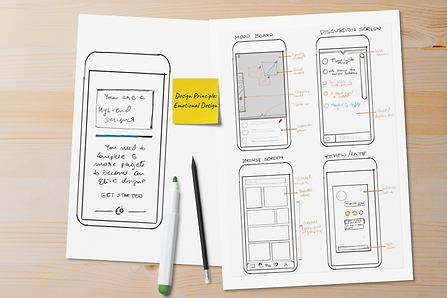
Mind mapping different task flows by brainstorming and crazy-8 technique.
The main intent of this app is to provide an easy and intuitive experience in reaching their goal. I sketched and iterated the designs multiple times until I had enough ideas on paper. I used the crazy-8 technique to brainstorm various screens. This process helped me in mind mapping the task flow of the app and designing it based on the priority of features and psychology of my users.

Design Principles
Aesthetics, Emotional Design & Goal-Gradient Effect
While sketching out a few ideas, I kept in mind the design principles and incorporated the gestalt principle of grouping and the goal-gradient effect.
Designers had expressed their need for motivation and appreciation. Based on this understanding, I created a reward page for designers. Designers will earn badges based on the number of projects they complete and also will be able to link these projects on other social media accounts.
Information Architecture
Let's see how Sayali 'Creates a new project to design'
The flow below demonstrates several tasks. Further in the process, I will elaborate this flow in the high-fidelity prototype.

Prototype
Mid-Fidelity Prototype & User Flow
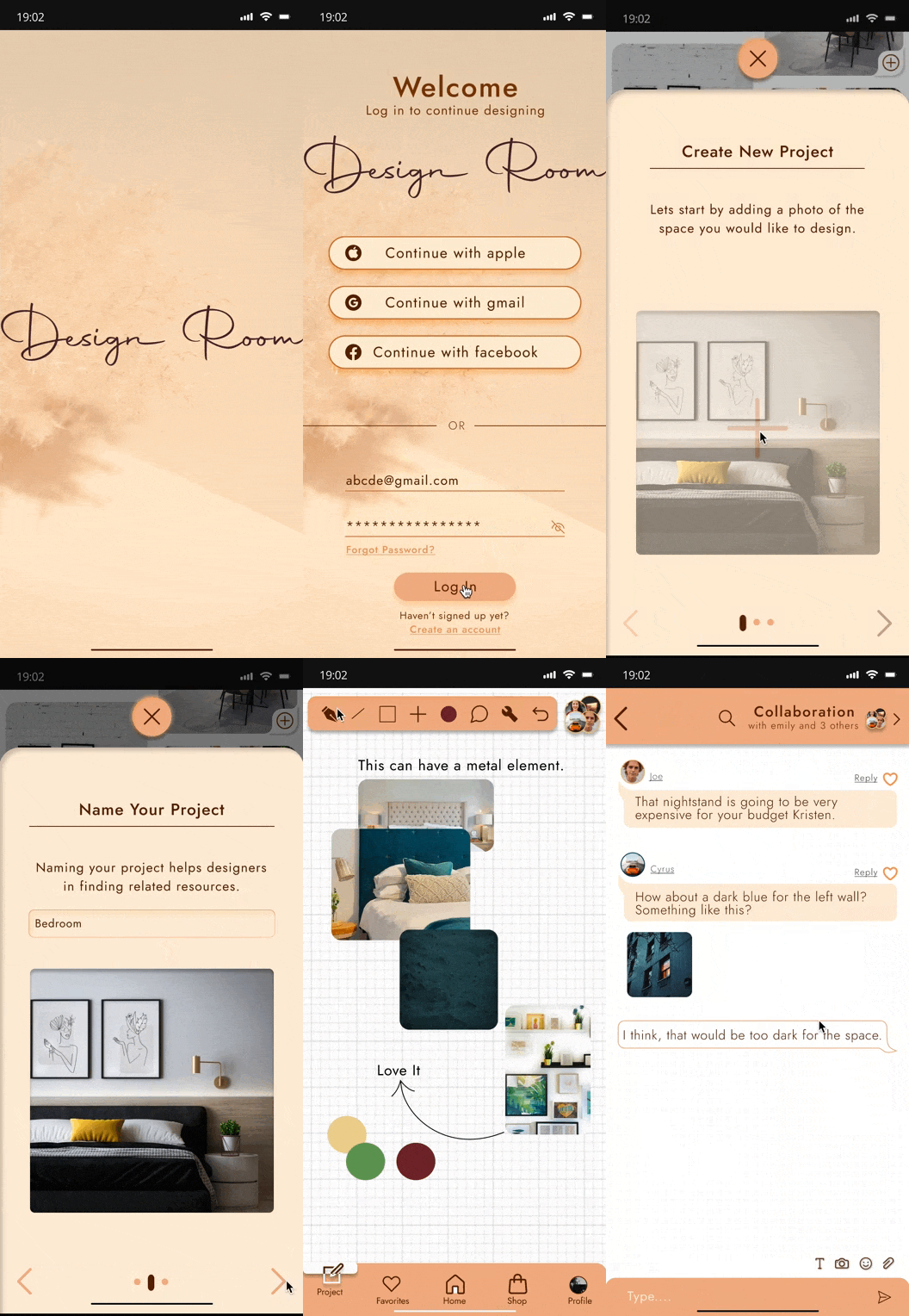
Mock up of a flow to 'Create a Project'
This mid-fidelity wireframe shows a user's interaction with the app and how a user (Sayali) would create a new project. These mid-fidelity wireframes helped me in visualizing the screens at every stage and understanding the use of screen's real estate available to display information.

Usability testing & feedback
Are users comfortable with the flow? Is the app engaging? Let's measure the success & error rate.
Testing:
It was time to test the typical flow with real users using the wireframe of the important screens of this app. I invited target audience to test the app. On conducting remote sessions with the user group of homeowners, I recorded their reactions and emotions while working on the task flow and further modified my prototype based on their responses and emotions while doing these tasks.
Observation:
-
The users seemed less stressed about the first task as it maintained the common task flow and did not require any conscious effort to complete the task
-
60% of the users paused for a few seconds and could not find the ‘Create Project’ button.
-
In the second task of creating a project, 90% of the users seemed happy about the ‘budget input field’

Customer Journey Map
Here's a story of how a user would feel at different touch points.
Through usability testing, I created a customery journey map that gave a visual picture of how the users would browse and engage with the app. It helped me in tell a story of the experiences that users will have during the interaction with the app.

A/B Testing
Studies show that users perceive aesthetically pleasing design as more usable design.
I developed three different color schemes and conducted short interview sessions with 5 to 6 users to understand what color the potential users will relate the brand with.

UI Kit
Combining researched data and aesthetically pleasing elements to develop a UI kit.
Designing the UI was a big learning curve. Considering factors like accessibility, buttons styles, grid system, navigation components, containers and so on, I started developing the high fidelity prototype of the app.

High- Fi Prototype
Building the final but iterative high-fidelity prototype.
The app will be for those curious and enthusiastic homeowners who love designing but find these platforms overwhelming and also for the young passionate interior designers who want to voice their opinions and channel their daily creative dose with a purpose.

Task: Create a Project


Additional Features

-
Browse Inspirations
-
Find professional interior designers
-
Search local artists based on your location
-
Find your favorite high-end furniture & home decor brands
-
View designers profile
-
Invite designers on your project with just a tap
-
Get to know what others think about the designer


-
Add and clip images, links, text
-
Chat with the professionals for expert opinions
-
Compare designer and affordable brands
-
Share moodboard


Challenges
Recruiting users- As my first UX project, I was still finding my own ways to design a solution and develop a process as I go. Recruiting users was challenging because users required an incentive to takeout time for something they ain't familiar with. During the process of designing and as I was learning from numerous articles, I found out my own way to tell a story to my users and engage them in a conversation to answer my questions. Of course, free doughnuts were offered too, sweet bribes never fail!
Learnings
I strive to make every phase of design meaningful and perfect. The struggle to come to a perfect solution blocked my creative thinking. In this case study, I learnt, that designing a user-centric solution is a continuous process. Designing experience shouldn't be perfect but should get better as you work on finding solutions.
My user research does not end here and I will always look for ways to improve the experience by listening to users' feedback.